
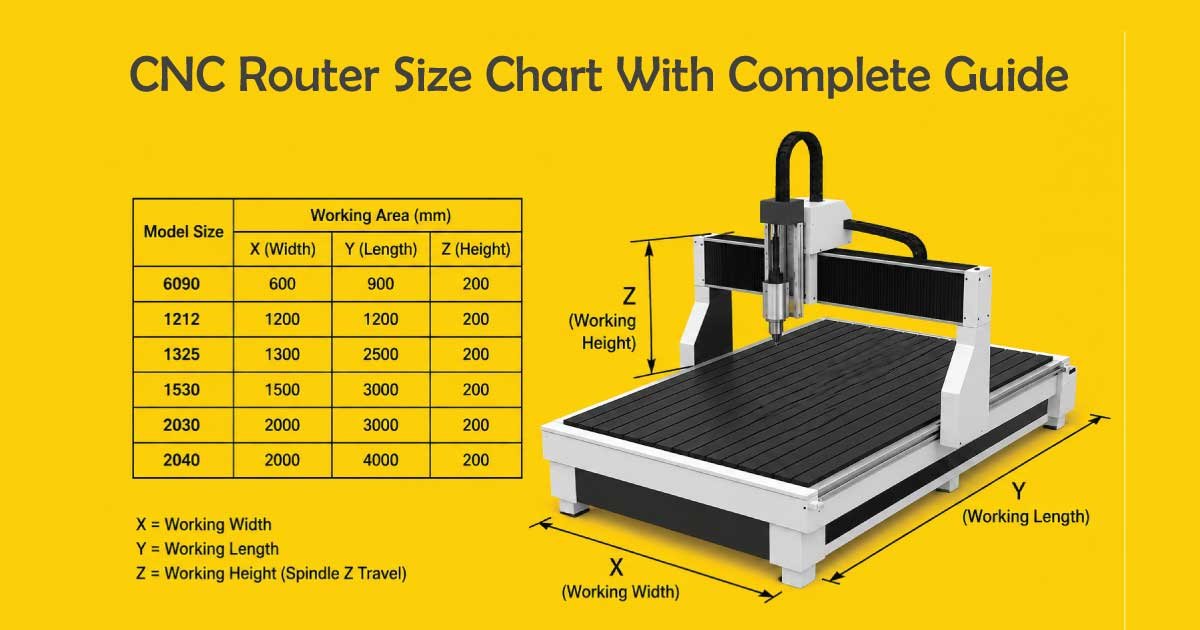
CNC routers are widely used in woodworking, metal fabrication, sign making, furniture production, plastic cutting, and industrial manufacturing. Choosing the correct CNC router size is one of the most important decisions because machine dimensions directly affect workspace capacity, material handling, production speed, and project capabilities.
Whether you are a hobbyist, small workshop owner, or industrial manufacturer, understanding CNC router sizes helps you select the right machine for your production needs. This complete guide explains CNC router dimensions, standard table sizes, cutting areas, spindle considerations, material compatibility, and machine selection tips.
What Is a CNC Router?
A CNC router is a computer-controlled cutting machine used for shaping, engraving, drilling, and carving materials with high precision. CNC stands for Computer Numerical Control, meaning the machine follows programmed instructions automatically.
CNC routers are commonly used for:
- Wood cutting
- Acrylic engraving
- Aluminum machining
- Plastic fabrication
- Cabinet making
- Sign production
- Foam cutting
- Furniture manufacturing
The machine moves along multiple axes to cut materials accurately according to digital design files.
Why CNC Router Size Matters
Choosing the correct CNC router size is an important decision that directly affects productivity, workspace efficiency, material handling, and overall project capability. The size of the machine determines what materials you can use, how large your projects can be, and how efficiently your production process runs. Selecting the right router size helps avoid limitations and improves long-term machining performance.
1. Material Capacity
CNC routers come in different bed sizes, and larger machines can handle bigger sheets, panels, and raw materials. This is especially important when working with plywood, MDF, acrylic, or composite sheets. A properly sized router allows full-sheet processing without frequent repositioning, improving accuracy and reducing setup time.
2. Workspace Efficiency
Machine size plays a major role in how much workshop space is required for installation and operation. Larger CNC routers need more floor space, proper ventilation, and safe operator movement areas. Choosing the right size ensures efficient workspace planning and helps maintain a safe and organized production environment.
3. Production Speed
A larger cutting area can improve workflow efficiency, especially for batch production or large-scale projects. It reduces the need for repeated setups and material repositioning. This helps speed up production cycles, improve consistency, and increase overall output in commercial or industrial applications.
4. Material Waste Reduction
Correct CNC router sizing helps minimize material waste by allowing full utilization of sheet materials. When the machine size matches the project requirements, there is less need for extra trimming or repositioning. This improves cost efficiency and ensures better material usage during production.
5. Project Capability
The physical dimensions of a CNC router determine the maximum size of finished products that can be manufactured. Smaller machines are limited to compact parts, while larger routers can produce full-scale panels, doors, signage, and structural components. Choosing the right size expands project possibilities and supports future growth.
Understanding CNC Router Sizes
CNC router size usually refers to the machine’s cutting area or table dimensions.
Common measurements include:
- X-axis travel
- Y-axis travel
- Z-axis travel
Example:
- 2 × 2 ft
- 4 × 4 ft
- 4 × 8 ft
- 5 × 10 ft
These sizes indicate the maximum workable material dimensions.
Standard CNC Router Size Chart
Below is a common CNC router size chart.
| CNC Router Size | Typical Application |
|---|---|
| 2 × 2 ft | Hobby projects |
| 2 × 4 ft | Small woodworking |
| 4 × 4 ft | Cabinet making |
| 4 × 8 ft | Full plywood sheets |
| 5 × 10 ft | Industrial production |
| 6 × 12 ft | Large manufacturing |
| 8 × 20 ft | Industrial panel processing |
Small CNC Router Sizes
Small CNC routers are ideal for beginners, hobbyists, and small workshops.
Common Small Sizes
| Router Size | Best For |
|---|---|
| 12 × 12 inch | Engraving |
| 24 × 24 inch | Hobby woodworking |
| 2 × 2 ft | Small signs |
| 2 × 4 ft | Small furniture parts |
Advantages of Small CNC Routers
- Lower cost
- Compact footprint
- Easy installation
- Lower power consumption
- Suitable for home workshops
Limitations
- Smaller cutting area
- Lower production capacity
- Limited sheet handling
Medium CNC Router Sizes
Medium-sized routers are popular among small businesses and professional workshops.
Common Medium Sizes
| Router Size | Common Use |
|---|---|
| 4 × 4 ft | Cabinet components |
| 4 × 6 ft | Sign making |
| 4 × 8 ft | Furniture production |
Why 4 × 8 CNC Routers Are Popular
The 4 × 8 CNC router is one of the most common industrial woodworking sizes because it fits standard plywood sheets.
Standard plywood dimensions:
4\ \text{ft} \times 8\ \text{ft}
This allows full-sheet cutting without trimming materials first.
Large CNC Router Sizes
Large CNC routers are designed for industrial manufacturing and mass production.
Common Large Sizes
| Router Size | Industrial Use |
|---|---|
| 5 × 10 ft | Large cabinetry |
| 6 × 12 ft | Industrial panels |
| 8 × 20 ft | Aerospace and composites |
Advantages of Large CNC Routers
- Higher production capacity
- Large material handling
- Faster workflow
- Reduced material repositioning
Limitations
- High cost
- Large space requirements
- Increased power consumption
- More complex installation
CNC Router Axes Explained
CNC routers move along different axes that control the direction and depth of cutting. These axes allow the machine to produce accurate shapes, detailed designs, and complex 3D structures. Understanding CNC router axes helps improve programming, machining accuracy, and overall project quality.
1. X-Axis
The X-axis controls the left-to-right movement of the CNC router. It is one of the main horizontal directions used to position the cutting tool across the width of the material. Accurate X-axis movement ensures precise cutting, alignment, and smooth horizontal machining operations.
2. Y-Axis
The Y-axis controls the front-to-back movement of the machine. It works together with the X-axis to move the tool across the surface of the workpiece. This axis is essential for shaping, contouring, and creating detailed 2D designs on flat materials.
3. Z-Axis
The Z-axis controls the up-and-down movement of the cutting tool. It determines the depth of each cut, engraving, or drilling operation. Proper Z-axis control is critical for maintaining consistent cutting depth and preventing damage to both the tool and material.
4. 3-Axis CNC Routers
3-axis CNC routers are the most common type used in woodworking, signage, and general manufacturing. They move along X, Y, and Z axes and are suitable for flat or simple 3D work.
Common Applications:
- Flat panel cutting
- Engraving
- Cabinet making
- Sign production
5. 4-Axis CNC Routers
4-axis CNC routers include an additional rotary axis that allows the workpiece or tool to rotate. This enables more complex machining without repositioning the material.
Common Applications:
- Cylindrical carving
- Furniture legs
- Rotary engraving
- Decorative 3D patterns
6. 5-Axis CNC Routers
5-axis CNC routers are advanced machines capable of moving in multiple directions simultaneously. They allow highly complex and precise machining operations in a single setup.
Common Applications:
- Aerospace components
- Automotive molds
- Complex 3D carving
- High-precision industrial parts
CNC Router Z-Axis Height Chart
Z-axis travel determines cutting depth capability.
| Z-Axis Height | Common Use |
|---|---|
| 3 inches | Thin sheet cutting |
| 6 inches | Cabinet work |
| 8 inches | Thick wood slabs |
| 12+ inches | Industrial applications |
CNC Router Table Types
Different CNC router table designs are used to support various materials, cutting methods, and production workflows. The table type plays an important role in material stability, machining accuracy, setup speed, and overall efficiency. Choosing the right table helps improve productivity and ensures secure material holding during operation.
1. Vacuum Tables
Vacuum tables use suction force to hold materials firmly in place during cutting operations. A vacuum pump creates negative pressure through small holes in the table surface, keeping sheet materials tightly secured without mechanical clamps.
Advantages:
- Fast setup and easy material loading
- Strong and even holding force across the surface
- Ideal for sheet materials like plywood, MDF, and acrylic
- Reduces the need for manual clamping
2. T-Slot Tables
T-slot tables use mechanical clamps, bolts, and fixtures that fit into T-shaped grooves on the table surface. This system allows flexible positioning and secure holding of different material shapes and sizes.
Advantages:
- Flexible clamping options for various workpieces
- Lower cost compared to vacuum systems
- Suitable for mixed materials and irregular shapes
- Easy to adjust setups for different jobs
3. Hybrid Tables
Hybrid CNC router tables combine both vacuum and T-slot systems in one design. This allows users to switch between suction-based holding and mechanical clamping depending on the material and application.
Advantages:
- Combines vacuum and clamping flexibility
- Suitable for a wide range of materials
- Improves workflow efficiency
- Ideal for mixed production environments
CNC Router Spindle Size Chart
Spindle power affects cutting capability.
| Spindle Power | Common Use |
|---|---|
| 1 HP | Hobby use |
| 2–3 HP | Small business |
| 5 HP | Professional woodworking |
| 10+ HP | Industrial cutting |
CNC Router Bit Size Chart
Router bits are available in many diameters.
| Bit Size | Typical Application |
|---|---|
| 1/8 inch | Fine engraving |
| 1/4 inch | General cutting |
| 1/2 inch | Heavy cutting |
| 3/4 inch | Large material removal |
Materials Supported by CNC Routers
CNC routers are highly versatile machines capable of processing a wide range of materials depending on spindle power, tool selection, feed rate, and machine rigidity. Different materials require different cutting strategies to achieve clean edges, accuracy, and smooth surface finishes. Understanding supported materials helps in selecting the right CNC router for specific applications.
1. Wood
Wood is one of the most common materials used in CNC routing due to its ease of cutting and wide application in furniture, cabinetry, and decorative work. CNC routers can handle both soft and hard wood types with high precision.
Common Wood Materials:
- Plywood
- MDF (Medium Density Fiberboard)
- Hardwood
- Softwood
2. Plastics
Plastics are widely used in CNC routing for prototypes, signage, and industrial components. They are generally easy to machine but require proper speed control to avoid melting or edge deformation.
Common Plastic Materials:
- Acrylic
- PVC
- HDPE (High-Density Polyethylene)
3. Metals
Some CNC routers with high rigidity and powerful spindles can machine soft metals. Metal cutting requires proper tooling and cooling to maintain precision and tool life.
Common Metal Materials:
- Aluminum
- Brass
- Copper
4. Foam
Foam materials are lightweight and easy to cut, making them ideal for packaging, modeling, and prototyping applications. CNC routers can shape foam with high speed and smooth detail.
Common Foam Materials:
- EVA foam
- Polyurethane foam
5. Composite Materials
Composite materials combine multiple elements for strength, durability, and lightweight properties. CNC routing of composites requires specialized tools to prevent damage or delamination.
Common Composite Materials:
- Carbon fiber panels
- Fiberglass sheets
Explore Our Latest Article:
Choose the Right CNC Router Size
Selecting the correct CNC router size is a critical decision that affects production efficiency, accuracy, and long-term business growth. The machine must match your material requirements, available space, and future expansion plans while staying within budget limits.
1. Consider Material Size
Choosing a CNC router starts with understanding the size of materials you commonly use. The machine should be large enough to handle your maximum sheet or workpiece without constant repositioning. This improves cutting accuracy, reduces material waste, and ensures smoother workflow during production.
2. Evaluate Workspace
Workspace availability is equally important when selecting machine size. A CNC router requires proper floor space not only for installation but also for operator movement, material loading, and maintenance access. Adequate space ensures safe operation, better efficiency, and avoids congestion around the machine area.
3. Think About Future Growth
Future business expansion should also influence your decision. If you expect higher production demand or larger projects, choosing a slightly bigger CNC router is a smart investment. It helps avoid early upgrades, reduces long-term costs, and supports scalability as your business grows over time.
4. Consider Budget
Budget plays a major role in machine selection. Larger CNC routers come with higher costs, including purchase price, shipping, installation, and electricity consumption. Balancing your financial limits with required features ensures you invest in a machine that is both practical and cost-effective for your operations.
CNC Router Size for Woodworking
Woodworking shops commonly use:
| Workshop Type | Recommended Size |
|---|---|
| Hobby shop | 2 × 2 ft |
| Small cabinet shop | 4 × 4 ft |
| Professional furniture shop | 4 × 8 ft |
| Industrial woodworking | 5 × 10 ft |
CNC Router Size for Sign Making
Sign makers often choose:
| Sign Type | Recommended Size |
|---|---|
| Small decorative signs | 2 × 2 ft |
| Medium business signs | 4 × 4 ft |
| Large commercial signs | 4 × 8 ft |
Explore Our Latest Article:
CNC Router Size for Aluminum Cutting
Cutting aluminum with a CNC router requires a rigid and stable machine because metal machining produces higher cutting forces compared to wood or plastic. The right machine size, along with strong structural design and proper spindle power, is essential for achieving accurate results, smooth finishes, and longer tool life.
1. Recommended Features
For efficient aluminum cutting, CNC routers must be equipped with strong mechanical and technical features that can handle the stress of metal machining.
Strong Frame
A heavy-duty frame is necessary to reduce vibration during cutting. Aluminum requires stability to maintain precision and avoid tool deflection or surface imperfections.
High Spindle Power
A powerful spindle ensures smooth cutting of metal materials without overheating or tool damage. Higher RPM control also improves machining accuracy.
Precision Rails
Linear guide rails provide smooth and accurate movement across all axes. High-quality rails reduce backlash and improve cutting precision in aluminum parts.
Cooling Systems
Cooling systems such as mist cooling or air cooling help reduce heat buildup during metal cutting. This improves tool life and prevents material deformation.
2. Common CNC Router Sizes for Aluminum Cutting
Different machine sizes are used depending on production needs, workshop space, and material dimensions.
- 2 × 4 ft – Suitable for small aluminum parts and prototypes
- 4 × 4 ft – Balanced option for medium-sized metal projects
- 4 × 8 ft – Ideal for large aluminum sheets and industrial production
Larger machines provide more flexibility for sheet processing, while smaller machines are better for precision work and limited workshop space.
Explore Our Latest Article:
Desktop CNC Routers
Desktop CNC routers are compact, small-sized machines designed for light-duty machining and small-scale projects. They are widely used by hobbyists, students, and small workshops where space and budget are limited. Despite their smaller size, they can still produce detailed and precise work for creative and technical applications.
Common Uses:
- Jewelry engraving
- PCB milling (circuit boards)
- Small crafts and decorative items
- Hobby woodworking projects
Advantages:
- Affordable and budget-friendly
- Compact size suitable for small spaces
- Beginner-friendly and easy to operate
Limitations:
- Limited cutting area for small workpieces
- Lower spindle power compared to industrial machines
- Slower production for large-scale tasks
Industrial CNC Routers
Industrial CNC routers are large, high-performance machines designed for mass production and heavy-duty manufacturing. These machines are built for continuous operation and high precision, making them suitable for commercial and industrial applications.
Features:
- Large work areas for oversized materials
- Automatic tool changers for efficiency
- High spindle power for tough materials
- Heavy-duty rigid machine frames
- Advanced CNC control systems
CNC Router Space Requirements
When planning a CNC router installation, machine size is only one part of the space requirement. Proper workspace planning is essential for safe operation, smooth workflow, and efficient production.
Additional Space Needed For:
- Material loading and unloading
- Dust collection systems
- Maintenance and servicing access
- Operator movement and safety clearance
Example:
A 4 × 8 CNC router typically requires more than 12 × 15 feet of total workshop space to allow safe operation, material handling, and maintenance access.
Explore Our Latest Article:
CNC Router Weight Chart
| Router Size | Approximate Weight |
|---|---|
| Desktop CNC | 50–150 lbs |
| 2 × 4 ft | 300–700 lbs |
| 4 × 8 ft | 1500–4000 lbs |
| Industrial routers | 5000+ lbs |
Common CNC Router Problems Related to Size
Choosing the wrong CNC router size can lead to serious production and efficiency issues. Size-related mistakes often affect cost, workflow, material handling, and machining capability, especially in long-term industrial use.
1. Buying Too Small
Selecting a CNC router that is too small can severely limit production potential. It restricts the size of materials you can process, increases the need for repositioning workpieces, and slows down workflow. Over time, this reduces efficiency and prevents business growth or handling larger projects.
2. Buying Too Large
A machine that is too large for your needs can create unnecessary expenses. It increases initial investment, requires more workshop space, and leads to higher operational costs. If production demand is low, much of the machine capacity remains unused, making it an inefficient investment.
3. Poor Material Support
When handling large sheets on an improperly sized or unsupported CNC table, material sagging can occur. This leads to inaccurate cuts, uneven surface finishing, and possible tool damage. Proper bed size and support systems are essential to maintain stability and ensure high machining precision.
4. Insufficient Z-Axis Height
Limited Z-axis height restricts the ability to machine thicker materials or deep cuts. This becomes a major issue in 3D carving or heavy-duty applications. Adequate Z-axis clearance is necessary for flexibility, allowing the machine to handle a wider range of materials and complex designs.
Explore Our Latest Article:
CNC Router Maintenance Tips
Proper maintenance of a CNC router is essential for keeping the machine accurate, efficient, and long-lasting. Regular care not only improves cutting quality but also reduces breakdowns, repair costs, and production delays.
1. Clean Rails Regularly
Dust, chips, and debris can accumulate on linear rails and guide systems over time. This buildup reduces smooth movement and affects cutting precision. Regular cleaning ensures smooth motion, better accuracy, and prevents long-term wear on critical machine components.
2. Lubricate Bearings
Bearings play a key role in smooth machine operation. Without proper lubrication, friction increases and parts wear out quickly. Regular lubrication reduces resistance, improves movement efficiency, and extends the lifespan of mechanical components, ensuring stable and reliable CNC performance.
3. Check Belt Tension
Proper belt tension is necessary for accurate machine movement. Loose belts can cause slipping, reduced precision, and uneven cuts. Regularly checking and adjusting belt tension helps maintain correct positioning, improves machining accuracy, and ensures consistent performance during long production runs.
4. Maintain Spindle Cooling
The spindle generates heat during continuous operation, especially in heavy cutting tasks. Effective cooling prevents overheating and protects internal components from damage. Maintaining proper airflow or coolant systems ensures stable spindle performance and increases overall machine durability.
5. Inspect Router Bits
Worn or dull router bits negatively affect cutting quality and increase machining time. Regular inspection helps identify damaged tools early. Replacing or sharpening bits ensures cleaner cuts, reduces machine strain, and improves overall finishing quality of CNC projects.
CNC Router Safety Tips
CNC routers are powerful machines, and proper safety practices are essential to prevent injuries, machine damage, and poor machining results. Following standard safety procedures ensures a safer working environment and more stable production performance.
1. Wear Safety Glasses
Protective eyewear is essential during CNC operations because cutting produces fast-moving chips, dust, and small debris. Safety glasses help prevent eye injuries and ensure operators can work confidently without exposure to harmful particles generated during machining processes.
2. Use Dust Collection
Dust collection systems are important for maintaining a clean and safe workspace. Wood, plastic, and composite materials produce fine particles that can affect breathing and machine performance. Proper dust extraction improves air quality and helps maintain consistent cutting accuracy.
3. Secure Materials Properly
Workpieces must be firmly fixed on the machine bed before starting any operation. Loose materials can shift during cutting, leading to inaccurate results, tool breakage, or accidents. Proper clamping or vacuum systems ensure stability and improve machining precision and safety.
4. Keep Hands Away from Moving Parts
Never place hands near moving spindle parts, cutting tools, or mechanical axes while the machine is running. CNC routers operate at high speeds, and even small contact can cause serious injury. Always pause or stop the machine before making any adjustments.
5. Use Proper Ventilation
Good ventilation is especially important when cutting plastics or synthetic materials, as they can release harmful fumes. A well-ventilated workspace or exhaust system helps maintain air quality, protects operator health, and creates a safer and more comfortable working environment.
Conclusion
Understanding CNC router sizes is essential for selecting the right machine for woodworking, sign making, metal fabrication, and industrial production. A proper CNC router size chart helps compare cutting areas, spindle capacities, table dimensions, and workspace requirements.
Small desktop routers work well for hobby projects, while 4 × 8 CNC routers remain the industry standard for professional woodworking and sheet processing. Larger industrial routers support mass production and oversized materials.
Before choosing a CNC router, consider your material sizes, workshop space, future production needs, and budget. Selecting the correct CNC router size improves workflow efficiency, reduces waste, and helps achieve accurate, professional-quality machining results.
Also Read:
FAQ:
What is the most popular CNC router size?
The most popular CNC router size is 4 × 8 ft because it matches standard plywood and MDF sheet dimensions. It is widely used in woodworking, furniture production, and sign making. This size offers a perfect balance of workspace capacity, material handling efficiency, and industrial productivity for professional and commercial applications.
Which CNC router size is best for beginners?
For beginners, 2 × 2 ft or 2 × 4 ft CNC routers are ideal because they are compact, affordable, and easy to operate. These machines are perfect for small engraving, crafts, and woodworking projects. Their small size reduces workspace requirements and helps users learn CNC programming safely and efficiently.
How do I choose the right CNC router size?
To choose the right CNC router size, consider your material size, workspace availability, production needs, and budget. The machine should handle your largest workpiece without repositioning. Also think about future growth so the router supports long-term use, avoids limitations, and improves overall productivity in commercial or industrial applications.
Can small CNC routers cut large sheets?
Small CNC routers cannot directly cut large sheets because their working area is limited. Users must reposition materials multiple times, which reduces accuracy and increases production time. This also raises the risk of misalignment. For full-sheet cutting, larger CNC routers like 4 × 8 ft are far more efficient and accurate.
What is Z-axis height in CNC routers?
Z-axis height refers to the vertical movement range of the CNC router spindle. It determines how thick a material can be cut and how deep engraving or carving can go. A higher Z-axis allows machining thicker materials and complex 3D designs, making the machine more versatile for industrial and woodworking applications.
Can CNC routers cut metal?
Yes, CNC routers can cut soft metals like aluminum, brass, and copper, but only if the machine has a rigid frame and powerful spindle. Proper tooling, slower feed rates, and cooling systems are essential. Standard woodworking routers are not suitable for heavy metals because they lack stability and cutting strength.
Why is CNC router size important?
CNC router size is important because it affects material capacity, production speed, and workspace efficiency. Larger machines handle bigger sheets and improve workflow, while smaller machines are better for compact work. Choosing the correct size ensures better accuracy, reduces material waste, and increases long-term productivity in any workshop or industry.
What is the difference between small and large CNC routers?
Small CNC routers are designed for hobby use, engraving, and small woodworking projects, while large CNC routers are used for industrial production and full-sheet processing. Small machines are affordable and compact, but large machines offer higher productivity, faster workflow, and better capability for handling large materials and commercial-scale manufacturing.
How much space is needed for a CNC router?
CNC routers require more space than their machine size alone. For example, a 4 × 8 ft CNC router typically needs at least 12 × 15 feet of total workspace. Extra space is required for material loading, operator movement, dust collection systems, and maintenance access to ensure safe and efficient operation.
What materials can CNC routers cut?
CNC routers can cut a wide range of materials including wood, plastics, foam, composites, and soft metals like aluminum. Common materials include plywood, MDF, acrylic, PVC, and fiberglass. Material capability depends on spindle power, tool selection, and machine rigidity, making CNC routers highly versatile for different industries and applications.