
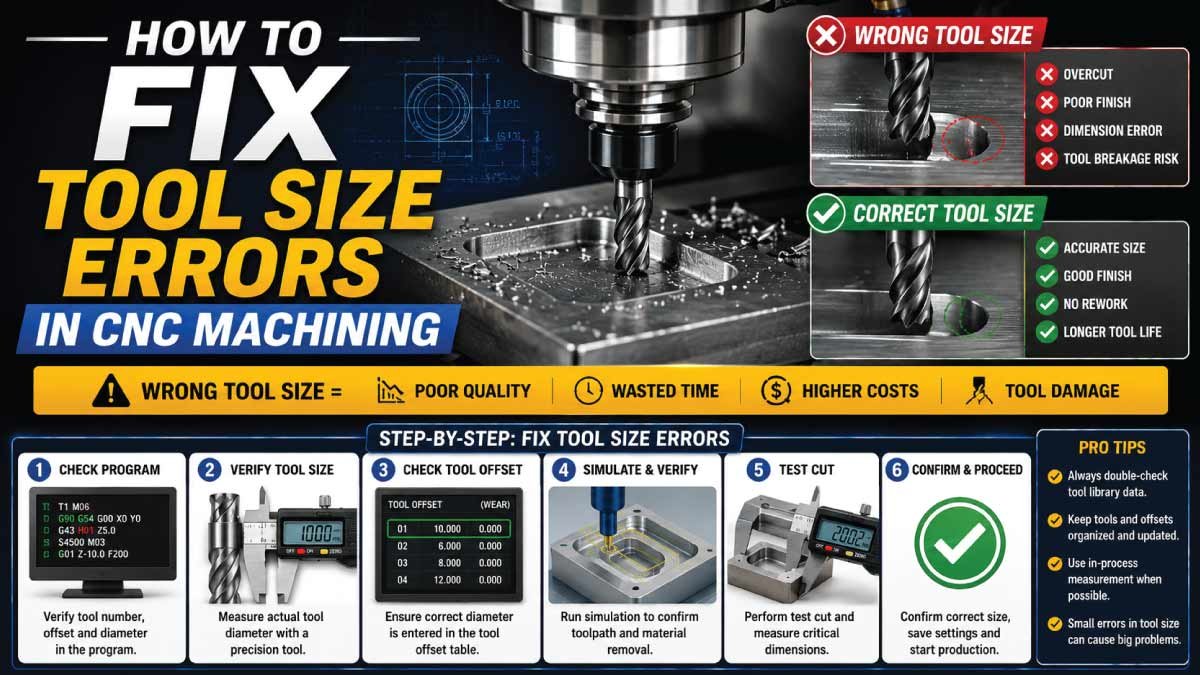
Tool size errors in CNC machining are one of the most frustrating problems for machinists and programmers. A small mismatch between the actual tool diameter and the programmed tool size can lead to poor surface finish, incorrect dimensions, scrap parts, or even tool breakage.
In CNC operations, precision is everything. That means even a 0.01 mm error in tool size can affect the final product quality. The good news is that most tool size errors are not permanent problems—they can be identified, corrected, and prevented with the right process.
In this detailed guide, you will learn what causes tool size errors in CNC machining, how to fix them step-by-step, and how to prevent them in future production.
What Are Tool Size Errors in CNC Machining?
Tool size error in CNC machining occurs when the machine uses incorrect data for the tool’s diameter, length, or offset values during programming or setup. Since CNC systems rely on precise digital inputs, even a small mismatch in tool size information can lead to major machining inaccuracies and production defects.
This leads to:
- Incorrect cutting path
- Oversized or undersized parts
- Poor surface finish
- Tool collisions or breakage
- Dimensional inaccuracies
In simple terms, the machine thinks the tool is one size, but in reality, it is different.
Why Tool Size Errors Happen in CNC Machining
Tool size errors usually occur due to human mistakes, incorrect setup data, or outdated tool libraries in the CNC control system. Since CNC machines depend entirely on programmed values, any incorrect input directly affects cutting accuracy and final part quality, especially in high-precision manufacturing environments.
Understanding the causes helps prevent costly machining errors and improves production reliability.
1. Incorrect Tool Offset Entry
Tool offset errors happen when the operator enters wrong diameter or length values into the CNC controller. Even a small mistake in offset data can shift the entire cutting path, leading to inaccurate machining results and rejected parts.
- Wrong tool diameter entered
- Incorrect length offset value
2. Worn or Damaged Cutting Tools
As cutting tools wear out over time, their actual size changes slightly. If the CNC system still uses the original tool dimensions, it creates a mismatch between expected and real cutting performance, resulting in dimensional errors and poor surface finish.
- Tool wear changes effective diameter
- Broken edges affect accuracy
3. Wrong Tool Selection in Program
Sometimes the CNC program calls a tool number that does not match the actual tool installed in the machine. This mismatch causes the machine to assume incorrect dimensions, leading to improper cutting depth or width.
- Incorrect tool number in code
- Mismatch between tool library and physical tool
4. Improper Tool Measurement
If tools are not measured accurately before setup, incorrect values are entered into the CNC system. Manual measurement errors or faulty measuring instruments can introduce small deviations that significantly affect precision machining results.
- Human error in measurement
- Poor calibration of measuring tools
5. Tool Holder and Setup Variation
Even if the tool size is correct, improper mounting in the tool holder can change the effective length or alignment. This leads to inconsistencies between programmed values and actual cutting behavior during machining operations.
- Loose tool clamping
- Incorrect tool holder seating
Impact of Tool Size Errors on Machining Quality
Tool size errors can severely affect machining accuracy and overall product quality. In precision industries, even a small deviation can cause parts to fail inspection or assembly. These errors not only waste material but also increase production time and operational costs.
Common impacts include poor dimensional accuracy, rough surface finish, increased tool wear, and machine downtime due to rework or corrections.
Common Types of Tool Size Errors
Before fixing any machining or CNC-related issue, it is important to clearly understand the type of tool size error involved. Each error affects machining accuracy in a different way and can lead to dimensional inaccuracies, poor surface finish, or even complete part rejection if not identified early.
1. Tool Diameter Error
Tool diameter error occurs when the actual cutting tool size does not match the value entered in the CNC program or tool offset table. Even a small difference can significantly affect final dimensions. For example, a programmed 10 mm end mill that has worn down to 9.8 mm will cut slightly more material, leading to undersized parts and tolerance issues.
2. Tool Length Offset Error
Tool length offset errors happen when the machine incorrectly calculates the tool’s Z-axis position. The CNC system relies on accurate length offsets to control cutting depth. If this value is wrong, the tool may cut too deep into the material or fail to reach the required surface, resulting in machining defects or incomplete cuts.
3. Tool Wear Not Updated
As tools are used during machining, they naturally wear down and lose their original cutting accuracy. If tool wear compensation values are not updated regularly, the machine continues operating with outdated data. This causes gradual dimensional drift, where each produced part slowly moves out of tolerance limits without being immediately noticed.
4. Wrong Tool Number Assignment
Sometimes the CNC program calls the wrong tool due to operator mistakes or programming errors. This leads to unexpected machining results because each tool has a different size and purpose. Using the incorrect tool can damage the workpiece, affect accuracy, and even risk tool breakage in severe cases.
5. Incorrect Tool Radius Compensation
CNC machines use cutter compensation functions such as G41 and G42 to adjust tool paths based on tool radius. If these settings are incorrect, the tool path shifts in the wrong direction. This results in inaccurate contours, incorrect part geometry, and overall poor machining precision.
Main Causes of Tool Size Errors
Understanding the root causes of tool size errors is essential for preventing them in future machining operations. Most issues arise from human error, poor maintenance practices, or incorrect machine setup. Identifying these causes helps improve accuracy and maintain consistent production quality.
1. Incorrect Tool Measurement
If tools are not measured properly before setting offsets, errors are almost guaranteed. Accurate measurement of tool diameter and length is critical for correct machining. Even slight inaccuracies during setup can lead to repeated dimensional problems throughout production.
2. Tool Wear During Machining
Tool wear is a natural process that occurs due to continuous cutting. High-speed machining, hard materials, and insufficient cooling accelerate this wear. As the cutting edge deteriorates, the effective tool size changes, which directly affects machining accuracy and part consistency.
3. Manual Data Entry Mistakes
One of the most common causes of tool size errors is incorrect manual input in the CNC tool table. A single wrong digit can completely change machining parameters, leading to defective parts. Careful verification is essential during data entry to avoid such costly mistakes.
4. Lack of Calibration
If the CNC machine is not properly calibrated, tool offsets and real-world measurements will not match. This misalignment leads to inaccurate cutting positions and inconsistent machining results. Regular calibration ensures that machine coordinates and tool data remain reliable and precise.
5. Wrong Toolholder Setup
Improper toolholder installation or incorrect tool insertion depth can change the effective tool length. If the tool is not securely clamped or seated correctly, it may shift during operation. This leads to variations in cutting depth and reduced machining accuracy over time.
Our Trending Post:
Step-by-Step Guide to Fix Tool Size Errors
Now let’s go through a practical troubleshooting process that helps identify and correct tool size errors in CNC machining. Following these steps carefully ensures accurate cutting, reduces scrap parts, and prevents machine damage while restoring proper machining accuracy.
Step 1: Stop the Machine Immediately
When a tool size error is detected during machining, the first and most important action is to stop the CNC machine immediately. Continuing operation can worsen the error, damage the workpiece, or even break the cutting tool, leading to higher repair costs and wasted material.
- Pause or stop CNC program immediately
- Prevent further damage to the part or tool
This avoids scrap production and machine damage.
Step 2: Inspect the Machined Part
After stopping the machine, carefully inspect the partially or fully machined part. This step helps you understand the type and severity of the error. Measuring the part allows you to determine whether the issue is related to tool diameter, tool length, or incorrect offsets.
Check the part carefully:
- Measure critical dimensions using calipers or micrometers
- Identify whether the part is oversized or undersized
- Compare with CAD model or drawing
This helps determine whether the error is diameter-related or length-related.
Step 3: Verify Tool Dimensions
Next, physically verify the actual tool dimensions to ensure they match the programmed values in the CNC system. Tools may wear down or be incorrectly measured before setup, causing differences between expected and actual cutting performance.
Remove the tool and measure it using:
- Tool presetter
- Micrometer
- Digital caliper (less accurate but useful)
Check:
- Diameter
- Length
- Wear condition
If the tool is worn, replace it immediately.
Step 4: Check CNC Tool Offset Table
The CNC tool offset table stores critical values that define tool size and position. If these values are incorrect, the machine will calculate the wrong toolpath. Reviewing and correcting this data is essential for restoring machining accuracy.
Go to machine control panel and verify:
- Tool diameter offset values
- Tool length offsets
- Wear compensation values
Look for:
- Wrong entries
- Missing values
- Duplicate tool numbers
Correct any incorrect data immediately.
Step 5: Recalculate Tool Compensation
Tool compensation ensures that the CNC machine adjusts its cutting path based on tool size. If compensation values are incorrect, even a properly measured tool can produce inaccurate results. This step ensures the tool path matches actual cutting conditions.
If cutter compensation is used:
- Verify G41 (left compensation) or G42 (right compensation)
- Ensure correct tool radius is applied
- Confirm toolpath direction matches program logic
Even a small mismatch here can shift cutting paths significantly.
Our Trending Post:
Step 6: Update Tool Wear Compensation
Tool wear is a normal part of machining, but it must be managed correctly. Instead of changing full tool size values every time, minor wear adjustments help maintain precision while extending tool life and reducing unnecessary replacements.
If the tool is worn but still usable:
- Adjust wear offset instead of changing full tool size
- Make small incremental corrections (e.g., 0.02 mm adjustments)
This helps maintain consistency without frequent tool replacement.
Step 7: Re-run Simulation (If Available)
Modern CNC machines often include simulation features that allow operators to preview tool movement before actual cutting. This step helps identify errors early and prevents costly mistakes during real machining operations.
- Check tool path before actual cutting
- Verify clearance and cutting depth
- Ensure no collisions or offset errors
Simulation can prevent expensive mistakes.
Step 8: Run a Trial Cut
Before starting full production, always perform a trial cut on scrap material. This helps confirm that all corrections are accurate and that the machine is producing parts within required tolerances.
- Perform a test cut on scrap material
- Measure dimensions
- Compare with required tolerance
If correct, proceed with full machining.
Common Mistakes That Cause Tool Size Errors
Many tool size errors in CNC machining occur because of repeated human mistakes that operators often overlook during daily work. These errors gradually reduce machining accuracy, increase scrap rates, and affect overall production quality. Understanding these common mistakes helps improve consistency and prevents recurring dimensional issues.
1. Using Worn Tools Without Checking
One of the most frequent mistakes is continuing to use worn tools without inspection. As tools wear down, their cutting diameter and efficiency change, which leads to progressive dimensional errors in every part produced. Ignoring tool condition results in inaccurate machining and inconsistent output quality over time.
2. Copying Wrong Offset Values
Reusing old tool offset values without proper verification is a serious error in CNC setup. Even small mismatches in tool diameter or length can affect machining accuracy. Copying outdated or incorrect values from previous jobs often leads to dimensional inconsistencies and part rejection.
3. Ignoring Tool Breakage Detection
Tool breakage is sometimes overlooked in manual machining setups where automatic detection systems are not used. A broken tool can continue cutting or remain undetected until significant damage occurs to the workpiece. This leads to poor surface finish, incorrect dimensions, and wasted material.
4. Not Updating Program After Tool Change
Failing to update the CNC program after changing a tool is a common programming mistake. If the machine continues using previous tool parameters, it will produce incorrect cuts. This can result in improper depth, inaccurate dimensions, and complete machining failure depending on the operation.
5. Skipping Test Cuts
Skipping test cuts and directly starting full production increases the risk of costly errors. Test cuts help verify tool size, offsets, and program accuracy before final machining. Without this step, even small setup mistakes can lead to large amounts of scrap and wasted material.
How to Prevent Tool Size Errors in CNC Machining
Preventing tool size errors is more efficient and cost-effective than fixing them after they occur. A proper combination of measurement, monitoring, standard procedures, and operator training can significantly improve machining accuracy and reduce production losses.
1. Always Measure Tools Before Use
Accurate tool measurement is the foundation of error-free machining. Using precise measuring instruments ensures that tool diameter and length are correctly set before operation. This step helps eliminate setup errors and ensures consistent machining results from the beginning.
2. Maintain Updated Tool Library
A properly maintained digital tool library helps keep all tool data organized and accurate. It should include tool diameter, tool length, and wear limits. Keeping this information updated ensures that operators always work with correct and verified tool parameters.
3. Use Tool Life Monitoring
Modern CNC systems include tool life monitoring features that track usage time and cutting conditions. These systems alert operators when a tool is nearing the end of its usable life. This helps prevent unexpected tool failure and maintains consistent machining accuracy.
Our Trending Post:
4. Standardize Offset Entry Procedure
A standardized process for entering tool offsets reduces the risk of manual errors. Following a fixed and verified procedure ensures consistency across all setups. It eliminates guesswork and improves accuracy when inputting tool diameter, length, and compensation values.
5. Train Operators Properly
Proper training is essential because most tool size errors are caused by human mistakes rather than machine faults. Skilled operators understand correct setup procedures, measurement techniques, and machine behavior. Continuous training improves accuracy, reduces errors, and increases overall production efficiency.
Example of Tool Size Error
To clearly understand the impact of tool size errors, let’s look at a practical CNC milling example. In real production environments, even a small deviation in tool diameter can significantly affect final part dimensions, leading to rejected batches, wasted material, and production delays if not detected early.
Imagine a CNC milling operation producing aluminum brackets:
Programmed tool diameter: 10 mm
Actual tool diameter after wear: 9.7 mm
Result:
- Internal pocket becomes oversized
- Part fails tolerance check
- Entire batch may be rejected
Fix:
- Update wear compensation by +0.15 mm
- Replace tool after batch completion
- Re-run calibration test
This example clearly shows how even a 0.3 mm difference in tool wear can lead to major production losses and quality failures in precision manufacturing.
When to Call a CNC Technician
While many tool size errors can be fixed through basic adjustments, some situations indicate deeper mechanical or electronic issues in the CNC system. In such cases, professional intervention is necessary to prevent further damage and restore machine accuracy.
You should involve a specialist if:
- Machine repeatedly produces inaccurate dimensions
- Offset system behaves unpredictably
- Axis calibration is unstable
- Tool breakage occurs frequently
A technician can perform deep diagnostics and restore machine accuracy.
Final Thoughts
Tool size errors in CNC machining are common challenges, especially in high-precision manufacturing environments. However, they are completely manageable when proper procedures, accurate measurements, and consistent monitoring practices are followed. Most issues are caused by human error, tool wear, or incorrect offset settings rather than serious machine failure.
The key to fixing and preventing these errors is:
- Accurate tool measurement
- Proper offset management
- Regular calibration
- Controlled machining conditions
- Consistent operator training
Once these practices are followed, CNC machining becomes highly reliable and precise, reducing scrap rates and improving overall production quality.
In short, precision is not just about machines—it is about process discipline, consistency, and attention to detail.