
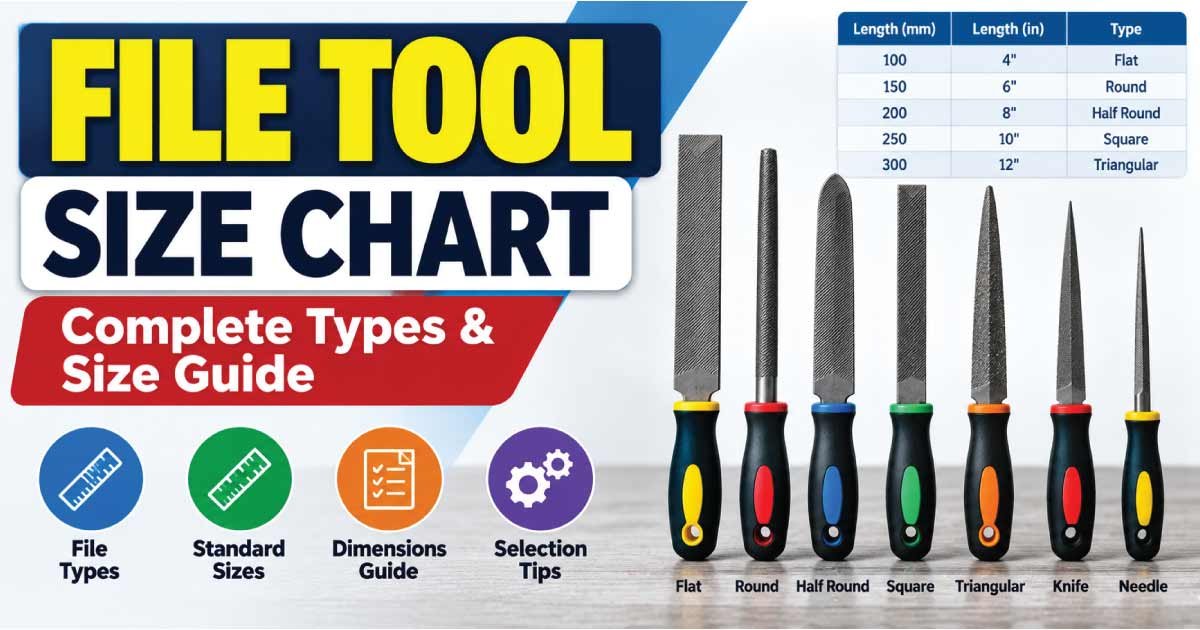
Choosing the correct file tool size is important when removing material, smoothing edges, shaping metal, enlarging openings, or finishing a workpiece. Hand files come in different lengths, shapes, cuts, and profiles, and each combination is suited to a particular type of work.
A file that is too coarse can remove material faster but may leave a rough surface. A file that is too fine may produce a smoother finish but take considerably longer for heavy stock removal. Similarly, the wrong profile can make it difficult to reach corners, slots, holes, or curved surfaces.
This file tool size chart explains common file lengths, shapes, cuts, applications, and selection considerations. It also covers flat, hand, round, half-round, square, triangular, needle, and specialty files so you can choose the appropriate file for your project.
What Is a File Tool?
A file is a hand-operated cutting tool with a hardened surface covered by teeth or cutting ridges. When the file is pushed or drawn across a workpiece, its teeth remove small amounts of material.
Files are commonly used on:
- Steel and other metals
- Aluminum and copper
- Wood
- Plastic and composite materials
- Automotive components
- Machine parts
- Fabricated metalwork
- Toolmaking and repair projects
A file’s performance depends on several characteristics. Length, cross-sectional shape, tooth cut, tooth spacing, and material all affect how the tool behaves.
File length is generally measured from the tip to the shoulder, excluding the tang that enters the handle. However, manufacturers may describe dimensions differently, so the manufacturer’s specifications should be checked when an exact size is required.
Common File Tool Size Chart
The following chart provides a practical reference for common hand-file lengths. Actual available sizes vary according to file type and manufacturer.
| File Length | Approx. Length in mm | Typical Use | General Work Level |
|---|---|---|---|
| 4 in | 100 mm | Small detailed work | Light |
| 6 in | 150 mm | General small work | Light to medium |
| 8 in | 200 mm | General workshop filing | Medium |
| 10 in | 250 mm | Larger workpieces | Medium to heavy |
| 12 in | 300 mm | Heavy material removal | Heavy |
| 14 in | 350 mm | Large surfaces | Heavy |
| 16 in | 400 mm | Large industrial work | Heavy |
These lengths are nominal reference sizes, not universal dimensions for every file design. A 10-inch flat file, for example, will have a different working profile from a 10-inch round file.
For most general workshop applications, medium-length files provide a useful balance between control and cutting capacity. Smaller files are easier to control in confined areas, while longer files can be more effective when working across larger surfaces.
File Sizes by Type
File size is only one part of selecting the correct tool. The shape and cross-section determine where the file can work.
1. Flat File Sizes
Flat files have broad, relatively flat faces and are among the most versatile hand files. They are commonly used for filing flat surfaces, edges, and general material removal.
Typical sizes include:
| Nominal Length | Common Application |
|---|---|
| 6 in / 150 mm | Small components and detailed work |
| 8 in / 200 mm | General-purpose filing |
| 10 in / 250 mm | Medium and larger workpieces |
| 12 in / 300 mm | Heavy stock removal |
| 14 in / 350 mm | Large surfaces and industrial work |
A longer flat file can cover more surface area with each stroke. A shorter file generally offers greater control when working on small components.
2. Hand File Sizes
Hand files resemble flat files but typically have one safe edge, making them useful for filing surfaces adjacent to another finished surface.
They are frequently used for:
- Fitting and bench work
- Deburring
- Squaring edges
- General metalworking
- Machining-related finishing
The safe edge helps reduce accidental cutting of an adjoining surface.
3. Half-Round File Sizes
A half-round file has one flat face and one curved face. This makes it useful for both flat and concave surfaces.
Common nominal lengths include 6, 8, 10, and 12 inches.
The curved side can work inside:
- Arcs
- Grooves
- Concave surfaces
- Curved openings
- Pipe-related components
The flat side can perform ordinary surface filing, making the half-round file a versatile choice.
4. Round File Sizes
Round files have a circular cross-section and are primarily used for curved or internal surfaces.
Their diameter is especially important because the file must fit the opening or groove being worked.
Common applications include:
- Enlarging holes
- Filing curved slots
- Smoothing internal radii
- Working on concave surfaces
- Sharpening certain tools
Unlike a flat file, the diameter of a round file is often more important than its overall length when selecting it for a specific opening.
5. Square File Sizes
Square files have four working faces and are useful for producing or refining square and rectangular openings.
They can be used for:
- Keyways
- Square slots
- Internal corners
- Grooves
- General material removal
A square file should be selected according to the width and depth of the feature being filed.
6. Three-Square or Triangular File Sizes
Triangular files, often called three-square files, have three faces and are useful for V-shaped grooves, internal angles, and certain sharpening tasks.
They are especially useful where a flat file cannot properly reach an angled feature.
Common applications include:
- V-grooves
- Internal angles
- Saw sharpening
- Narrow slots
- Specialized fitting work
The angle and dimensions of the file should match the geometry of the workpiece.
File Shape and Application Chart
The shape of a file is closely connected to the type of surface it can reach.
| File Shape | Cross-Section | Common Uses |
|---|---|---|
| Flat | Rectangular | Flat surfaces, edges |
| Hand | Rectangular with safe edge | Edges and fitting |
| Half-round | Flat and curved | Flat and concave surfaces |
| Round | Circular | Holes, curves, grooves |
| Square | Square | Slots, corners, keyways |
| Triangular | Three-sided | V-grooves, angles, sharpening |
| Knife-edge | Wedge-shaped | Narrow slots and angles |
| Needle | Small specialized profiles | Precision and detail work |
The best file is therefore not necessarily the longest or coarsest one. It is the file whose profile, dimensions, and tooth pattern match the workpiece.
Understanding File Cuts and Coarseness
Two files of the same length and shape can perform very differently because of their tooth pattern.
The term file cut describes the arrangement and character of the cutting teeth. Common classifications include bastard, second cut, and smooth, although terminology can vary among manufacturers and file styles.
Bastard Cut
A bastard-cut file generally has relatively coarse teeth and is intended for faster material removal.
It is useful when:
- Significant material must be removed
- The surface is relatively rough
- Speed is more important than final finish
- The workpiece requires initial shaping
A coarse file generally leaves a rougher surface than a finer file.
Second-Cut File
Second-cut files provide a middle level of coarseness. They are commonly used for general-purpose filing and intermediate finishing.
They are useful when you want a balance between:
- Material removal
- Surface control
- Finishing quality
For many workshop tasks, a second-cut file can be a practical transition between aggressive stock removal and final finishing.
Smooth-Cut File
Smooth files have finer teeth and are intended primarily for finishing.
They are useful for:
- Refining a previously filed surface
- Removing smaller amounts of material
- Improving surface smoothness
- Fitting components carefully
A smooth file is generally not the best choice for quickly removing a large amount of material.
File Cut Chart
| Cut Type | Relative Tooth Coarseness | Typical Purpose |
|---|---|---|
| Bastard | Coarse | Fast stock removal |
| Second cut | Medium | General filing and intermediate work |
| Smooth | Fine | Finishing and controlled material removal |
These descriptions are general. Tooth geometry and classification can vary by file type, manufacturer, and application.
How File Length Affects Performance
The length of a file affects handling, contact area, stroke, and control.
A short file is often easier to control on small components. It can be particularly useful when working around tight spaces or detailed features.
A longer file can be advantageous on larger surfaces because more of the workpiece can be contacted during a stroke. It may also make it easier to produce a consistent surface when filing broad areas.
However, choosing a file simply because it is longer is not always correct. The file must also fit the workpiece and provide the required profile.
Consider:
- Workpiece size
- Available working space
- Required surface finish
- Amount of material to remove
- Shape of the surface
- Level of control required
How to Choose the Correct File Tool Size
Selecting the right file becomes much easier when you evaluate the job before choosing the tool.
1. Identify the Material
First determine what you are filing. A file intended for metalworking may not be the appropriate choice for wood or another material.
For metalwork, consider the hardness and characteristics of the material. Softer materials may also require attention to tooth spacing because material can clog between teeth.
2. Determine the Surface Shape
Look at the surface you need to work on.
- Flat surface: Choose a flat or hand file.
- Concave surface: Consider a half-round file.
- Circular opening: Consider a round file.
- Square opening: Use a square file.
- V-shaped groove: A triangular file may be appropriate.
- Narrow slot: A specialty profile may provide better access.
3. Select the Required File Length
Choose a length that is appropriate for the size of the workpiece.
A small component may be easier to control with a 6-inch file, while a larger flat surface may benefit from a 10- or 12-inch file.
These are practical examples rather than mandatory rules.
4. Choose the Tooth Cut
Use a coarser cut when more material needs to be removed and a finer cut when finishing is the priority.
For a typical filing sequence, you may use:
Coarse cut → intermediate cut → fine cut
Not every job requires all three stages.
5. Consider Access
A file must physically reach the area being worked. A large file may be ineffective if the workpiece contains a narrow recess or tight internal corner.
For confined areas, a smaller or specialized file may provide significantly better control.
Also Read:
How to Measure a File Tool
If you need to identify the size of an existing file, measure the dimensions carefully.
File Length
Measure the working portion from the tip to the shoulder, rather than including the tang or handle.
File Width
For flat files, measure the widest dimension across the working face.
File Thickness
Measure the thickness at the relevant location. File profiles can taper, so thickness may not be identical along the entire working length.
Round File Diameter
For round files, measure the diameter of the working section.
Tang
The tang is the narrow portion that enters the handle. It normally is not included when manufacturers state the nominal working length of a file.
When replacing a file, do not rely solely on length. Shape, width, thickness, diameter, cut, and tang design may all matter.
File Tool Size vs. File Shape
One common mistake is assuming that two files with the same length are interchangeable.
For example, an 8-inch flat file and an 8-inch round file have the same nominal length but completely different applications.
The key selection attributes are:
| Attribute | Why It Matters |
|---|---|
| Length | Affects reach and working stroke |
| Shape | Determines accessible surfaces |
| Width | Important for flat surfaces |
| Thickness | Affects profile and access |
| Diameter | Critical for round files |
| Cut | Controls material removal and finish |
| Safe edge | Helps protect adjoining surfaces |
| Handle | Affects comfort and control |
Think of file selection as matching the tool geometry to the workpiece geometry, rather than simply selecting a size number.
Also Read:
Common File Tool Applications
Files are used in many workshop and repair situations.
Metalworking
Metal files are commonly used to remove burrs, adjust edges, fit components, and refine surfaces after cutting or machining.
Automotive Repair
Files can be useful for controlled material removal, deburring brackets, adjusting fabricated components, and cleaning up edges.
Fabrication
Fabricators may use different file profiles to remove sharp edges and refine cut surfaces.
Tool Maintenance
Specialized files can be used for certain sharpening and maintenance operations. The correct profile and technique depend on the tool being maintained.
Woodworking
Wood files and rasps are designed specifically for removing material from wood. Their tooth patterns are generally different from conventional metalworking files.
Precision Work
Small needle files are useful for detailed work where larger files cannot provide sufficient access or control.
Also Read:
Files vs. Rasps
Files and rasps are related hand tools, but they are not identical.
A conventional file generally has relatively fine, regularly formed teeth designed for controlled material removal and finishing. A rasp typically has more pronounced individual teeth and is commonly associated with aggressive shaping, particularly in wood and other softer materials.
| Feature | File | Rasp |
|---|---|---|
| Tooth style | Generally finer and more regular | Larger individual teeth |
| Typical use | Filing and finishing | Aggressive shaping |
| Common materials | Metal and other materials | Often wood and softer materials |
| Surface finish | Can provide relatively fine finishes | Generally rougher |
The appropriate tool depends on the material and the desired result.
Common File Tool Sizes for Different Jobs
There is no single file size that works for every task. The following guide provides practical starting points.
| Job | Suitable File Type | Typical Starting Size |
|---|---|---|
| Small metal component | Flat or hand file | 6–8 in |
| General bench filing | Flat or hand file | 8–10 in |
| Large flat surface | Flat file | 10–14 in |
| Concave surface | Half-round file | 8–12 in |
| Hole or circular opening | Round file | 6–10 in |
| Square slot | Square file | 6–10 in |
| V-groove | Triangular file | 6–10 in |
| Detailed work | Needle file | Small profile |
These are general selection examples, not fixed specifications. The correct size depends on the workpiece dimensions, access, material, and required finish.
Common Mistakes When Choosing a File
Using the wrong file can make a simple job unnecessarily difficult.
Choosing Only by Length
An 8-inch file is not automatically suitable just because the workpiece is small. Profile and cut are equally important.
Using a Fine File for Heavy Stock Removal
A fine file can take considerably longer when a large amount of material needs to be removed. Start with a suitable coarser file when appropriate, then move to a finer cut for finishing.
Using a Coarse File for Final Finishing
Coarse teeth can leave deeper marks. If surface quality matters, finish with an appropriate finer file.
Ignoring the Profile
Trying to use a flat file inside a round opening or a round file on a broad flat surface can produce poor results and reduce control.
Using a Damaged File
A file with damaged teeth, cracks, or an unsuitable handle should not be treated as a normal working tool. Inspect files before use.
Using a File Without a Proper Handle
The tang is designed to fit into a handle. A properly fitted handle improves control and helps reduce the risk associated with handling an exposed tang.
Tips for Using Files Correctly
Good filing technique improves both the finish and the life of the tool.
- Secure the workpiece firmly before filing.
- Select the file profile that matches the surface.
- Use a suitable cut for the amount of material being removed.
- Keep the file clean and free from excessive debris.
- Avoid forcing the tool unnecessarily.
- Use controlled strokes rather than erratic movements.
- Protect finished surfaces from accidental contact.
- Use appropriate personal protective equipment for the task.
- Inspect the handle and file before use.
- Replace damaged or unsafe tools.
For metalworking, a file card or suitable cleaning method can help remove material trapped between teeth. Always follow the tool manufacturer’s recommendations.
Frequently Asked Questions About File Tool Sizes
What is the most common file size?
There is no single universal standard size for every file application. 8- and 10-inch files are common practical choices for general workshop work, but the correct size depends on the file type and workpiece.
What does an 8-inch file mean?
An 8-inch file generally refers to the nominal length of the file’s working portion, rather than the complete length including the handle. Exact measurement conventions can vary, so manufacturer specifications should be checked.
Which file is best for removing a lot of material?
A suitable coarse-cut file, such as a bastard-cut file, is generally better for significant material removal than a smooth file. The correct choice also depends on the material and file type.
Which file is best for finishing?
A smooth-cut file is generally used when a finer surface finish and controlled material removal are required.
What file should I use for a round hole?
A round file is commonly used for circular openings. The file diameter should be appropriate for the opening and the amount of material that needs to be removed.
What file should I use for a square hole?
A square file can be used for developing or refining square openings, corners, and slots. The file dimensions must fit the feature being worked.
What is the difference between a flat file and a hand file?
Both have a generally rectangular profile, but a hand file commonly has a safe edge that allows filing closer to an adjoining surface without cutting that edge.
How do I choose between a coarse and fine file?
Choose based on the amount of material and desired finish. A coarse file is generally better for faster stock removal, while a fine file is more appropriate for finishing and controlled removal.
Final File Tool Size Selection Guide
A good file tool size chart is useful as a starting point, but file selection should never be based on length alone. The best tool is determined by the relationship between file size, profile, cut, material, workpiece geometry, and required finish.
For quick reference:
- Choose flat files for broad flat surfaces and edges.
- Choose hand files when a safe edge is useful.
- Choose half-round files for flat and concave surfaces.
- Choose round files for holes, grooves, and curved features.
- Choose square files for slots and square openings.
- Choose triangular files for V-grooves and angled surfaces.
- Choose coarse cuts for greater material removal.
- Choose fine cuts for finishing.
- Choose shorter files for greater control in small or restricted areas.
- Choose longer files when working across larger surfaces.
Most importantly, treat published file dimensions as nominal tool specifications. Exact dimensions, tooth patterns, and available sizes can differ between manufacturers and file designs. When precision matters, check the manufacturer’s technical information before selecting or purchasing a file.
With the correct file size, shape, and cut, filing becomes more controlled, efficient, and predictable, whether you are performing general workshop maintenance, metal fabrication, fitting, repair, or detailed finishing work.